Animal Fonts: Capturing Wildlife Charm Without the Design Headaches
The Allure of Animal-Inspired Typography
In the world of graphic design, typography is often the silent workhorse, but when you introduce Animals into the mix, the text becomes part of the artwork itself. Whether you are creating a whimsical invitation for a child’s birthday, designing a poster for a local zoo, or crafting a logo for a pet grooming service, animal-themed fonts offer a unique way to convey personality. These typefaces range from fonts featuring paw prints and animal silhouettes to playful, hand-drawn styles that mimic the energy of the wild. For creators, entrepreneurs, and hobbyists, these fonts are not just letters; they are illustrations that tell a story before the reader even processes the words.
However, the journey from downloading a fun animal font to successfully cutting it out on a vinyl project or printing it on a brochure is fraught with technical pitfalls. Many users, particularly those new to digital crafting and design, assume that a font is a universal tool that works the same way everywhere. This misunderstanding leads to wasted time, ruined materials, and significant frustration. To get the most out of these creative assets, one must look beyond the aesthetic appeal and understand the technical mechanics of font files.
The Critical Distinction: Monochrome vs. Color Fonts
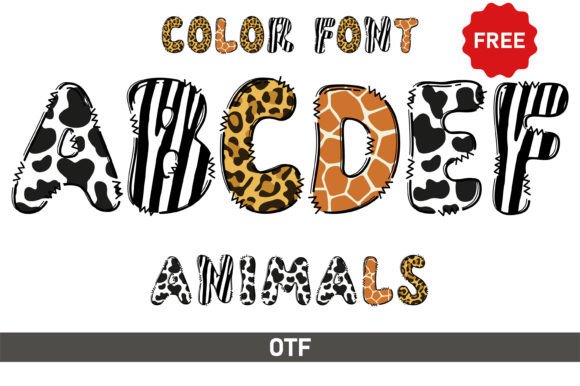
One of the most common mistakes when working with Animals and decorative fonts is confusing standard monochrome fonts with color fonts (also known as chromatic fonts). A standard font is a vector outline. It is essentially a shape that you can fill with any single color. A color font, however, contains embedded data that dictates specific colors, gradients, or textures within the font file itself. This distinction is vital because it dictates which software and hardware can actually read the file.
Imagine you have downloaded a beautiful font with animal faces inside the letters. If you try to load this into a basic cutting machine interface expecting to cut out the colored parts, you may run into a wall. Many design environments, particularly those optimized for hardware like the Cricut, struggle to interpret the complex data of a color font. They may flatten the image, turn it into a solid black block, or simply reject the file. This results in a loss of all the intricate details that made the font attractive in the first place.
Navigating Software Compatibility
To avoid this specific pitfall, you must treat black (monochrome) and color versions of a font as two entirely different tools. If your goal is to use a cutting machine such as a Cricut or a basic Silhouette model, you must stick to the standard black version of the font. These versions are typically provided in OTF or TTF formats that these machines can parse as vector outlines.
Conversely, if you are using professional design software like Adobe Photoshop, Adobe Illustrator, or the advanced versions of Silhouette Studio, you can leverage the color versions. These programs are built to handle complex layering and embedded color data. A practical approach for creators is to always check the file extension and the "Read Me" file included with the download. If the font is labeled as a "Color Font," assume it will not work in Cricut Design Space until proven otherwise. This simple check can save you hours of troubleshooting why your Animals font looks like a solid blob rather than a detailed illustration.
Avoiding the "Raster Trap" in Font Selection
Another frequent error involves the resolution and format of the font files. While OTF and TTF are standard vector formats, some designers bundle their "fonts" with PNG packs. Beginners often mistake these raster images for actual typeable fonts. While PNGs are excellent for scrapbooking or digital stickers because they have transparent backgrounds, they cannot be scaled infinitely without losing quality.
If you use a low-resolution PNG of an animal font for a large poster, the result will be pixelated and unprofessional. Always verify that you are downloading the actual font installer files (OTF/TTF) if you intend to type freely and resize your text. If you are working with a logo that needs to be printed on a billboard or a banner, vector capability is non-negotiable. Relying on raster images for typography is a shortcut that often leads to poor presentation and a lack of scalability.
Readability vs. Aesthetics
When selecting Animals fonts, it is easy to get swept up in the novelty of the design. A font where the crossbars of the 'A' are made of giraffe necks or the 'O' is a panda face is charming, but it can be a disaster for readability. A common mistake is using these highly illustrative fonts for body text or critical information like dates and addresses on invitations.
The golden rule of typography applies even to animal themes: decorative fonts are for headlines, not paragraphs. If you use a complex animal font for a block of text, your audience will struggle to read it, and the message will be lost. The better approach is to pair your animal font with a clean, sans-serif font. Use the Animals typeface for the main header—like "Welcome to the Zoo"—and a simple font like Arial or Helvetica for the details. This contrast ensures that the design remains playful without sacrificing clarity.
Technical Checks Before You Buy or Download
Before committing to a font, especially a paid one, there are a few due diligence steps that professionals take to ensure quality and compatibility.
- Check the Glyphs: Does the font include only uppercase letters, or does it have a full lowercase alphabet? Some animal fonts are "display only" and lack numbers or punctuation, which can be frustrating if you are trying to type a full sentence.
- Test the Spacing: Download a free sample or check the preview images closely. Does the spacing between letters look even? Poor kerning (spacing) can make a font look amateurish, no matter how cute the animal illustrations are.
- Verify Commercial Licensing: If you are a small business owner making t-shirts to sell, you need a commercial license. Many free font sites offer "Personal Use Only" licenses. Using these for profit is a legal risk that can lead to costly fines later.
Better Approaches for Layering and Effects
For those using the color versions of these fonts in Photoshop or Illustrator, a misunderstanding of layering can ruin the effect. Because color fonts are often treated as a single block of data, you cannot easily change the color of just the "animal" part of the letter without some technical know-how.
A better approach is to treat the color font as a graphic element rather than text. Once you have typed your word, rasterize the layer (in Photoshop) or expand the appearance (in Illustrator). This converts the text into shapes. Now, you can use masking tools to isolate specific animal features, change colors to match your brand palette, or apply textures. This extra step transforms the font from a static asset into a flexible design element that truly integrates with your project.
The Final Polish
Ultimately, working with Animals fonts is about balancing creativity with technical awareness. Whether you are a hobbyist making stickers for fun or a marketer designing a campaign, the success of your project relies on choosing the right file type for your hardware and respecting the limitations of decorative typography. By verifying software compatibility, ensuring you have vector files for scaling, and prioritizing readability, you ensure that your animal-themed designs look professional and communicate effectively. Do not let a technical oversight mute the personality of your work; plan your workflow, and let the wild side of your design shine through cleanly.