Designing with Pastel Rainbow: A Practical Guide to Using Color Fonts Effectively
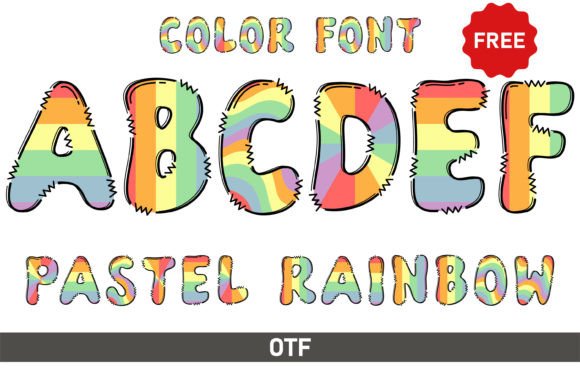
Color fonts have opened up a world of creative possibility, and Pastel Rainbow is a prime example of their charm. This typeface features a spectrum of soft, soothing hues—think gentle pinks, cool mints, serene lavenders, and soft baby blues—directly embedded within each character. For designers, it offers a quick way to add whimsy, playfulness, and a dreamy aesthetic to invitations, social media graphics, posters, and branding materials. However, the very features that make color fonts like Pastel Rainbow so appealing also introduce unique technical considerations. Overlooking these details can lead to frustrating results, wasted time, and designs that don't meet your vision. Understanding how to work with this specific font technology is the first step toward creating truly enchanting work.
Understanding the Core Technology: What Makes Pastel Rainbow Different
Before diving into projects, it's crucial to understand that Pastel Rainbow is an OpenType-SVG color font. This isn't a standard font file. Traditional fonts (OTF, TTF) are vector outlines filled with a single color you choose. An OpenType-SVG font, however, contains full color and gradient information within the font file itself. Each glyph is essentially a tiny, pre-colored SVG image. This is what allows for those beautiful pastel gradients and multi-color effects without any extra work on your part. However, this technology requires specific software support. It's fully compatible with modern versions of Adobe Photoshop, Illustrator, Silhouette Studio, and Inkscape. The key misunderstanding here is software compatibility. The product details clearly state that the OTF and TTF files are not compatible with Cricut Design Space. Attempting to upload them there will result in an error or a plain, single-color outline, defeating the entire purpose of the font.
Avoiding the Most Common Pitfall: Software and File Type Confusion
The single biggest mistake users make is purchasing or downloading a color font without verifying their software can handle it. This leads to immediate disappointment. Imagine designing a beautiful baby shower invitation in a basic editor, only to find Pastel Rainbow appears as a generic, black Arial font. The solution is straightforward: always check your software's version and capabilities first. For instance, Inkscape must be a recent version (1.0 or later) to render OpenType-SVG correctly. Silhouette Studio requires the Business Edition upgrade. Don't rely on assumptions. A better approach is to download any free sample or preview file a foundry offers and test it in your specific design environment before committing to a full project or purchase. This simple test saves you from the frustration of a font that simply won't display its signature pastel beauty.
Practical Application: Beyond Just Typing
Even with compatible software, using Pastel Rainbow effectively requires a shift in mindset from standard typography. Because the colors and gradients are baked into the font, you lose the ability to change the color of individual letters in the traditional way. This is a critical point for brand consistency. If your project requires the pink in the font to match a specific Pantone or hex code from your brand palette, Pastel Rainbow may not be the right tool. Its value is in its curated, pre-set aesthetic.
A better approach is to use Pastel Rainbow as a highlight or accent font, not for all body text. Its whimsical nature is perfect for headlines, subheadings, short quotes, or call-to-action phrases. Pair it with a clean, neutral sans-serif or serif font for longer paragraphs. This creates visual hierarchy and ensures readability while letting the pastel colors shine where they'll have the most impact. For example, on a social media post, use Pastel Rainbow for the main hook ("Spring Sale!"), and a simple font for the details and dates below.
Optimizing for Different Outputs: Print vs. Digital
The medium dictates your workflow. When designing for digital screens—social media graphics, websites, or digital invitations—Pastel Rainbow is straightforward. The colors will render vibrantly on monitors and mobile devices. However, for print projects, extra diligence is required.
Color fonts can sometimes present challenges for commercial printers. To avoid issues, the safest practice is to convert your text to outlines or rasterize the layer in Photoshop or Illustrator before sending the final file to a print shop. This embeds the exact colored shapes into the document, removing the dependency on the font file being installed on the printer's system. Always request a proof, especially for color-critical work like wedding invitations, to ensure the pastel gradients reproduce accurately on paper. A common mistake is sending a native file with the live font, which may cause the printer's RIP software to substitute it, ruining your design.
Making an Informed Decision: Is Pastel Rainbow Right for You?
Before you choose this font for your next project, run through this quick checklist:
- Software Check: Confirm you are using a recent version of Photoshop, Illustrator, Silhouette Business Edition, or Inkscape 1.0+.
- Project Suitability: Is the pre-set pastel palette exactly what you need, or do you require strict brand color matching? If the latter, a standard font with manual gradient fills might be more efficient.
- Output Medium: Are you designing for digital or print? If for print, are you prepared to outline or rasterize the text and communicate clearly with your printer?
- Usage Context: Will it be used for impactful, short text elements where its playful character enhances the message, rather than for dense, readable paragraphs?
By taking these factors into account, you move from simply using a font to strategically employing a design tool. Pastel Rainbow, when used correctly, is more than just a typeface; it's a shortcut to a specific, joyful aesthetic. It excels at conveying themes of celebration, gentleness, creativity, and nostalgia. Its value lies in its ability to instantly infuse a design with that dreamy, enchanting charm, but only if you navigate its technical requirements with care. Avoid the common oversights, and you'll find it to be a delightful and powerful asset in your creative toolkit.