Caroolyn: A Modern Serif Font for Elegant Design Projects
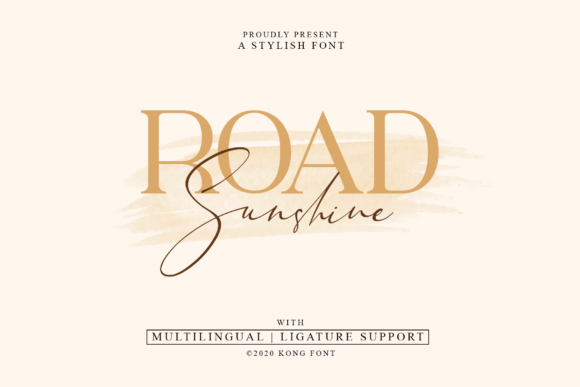
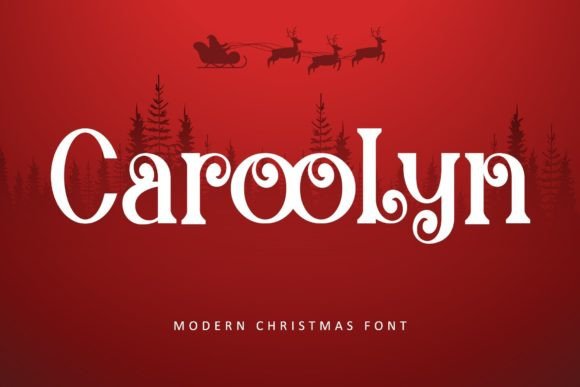
Finding the right typeface for a project can feel like searching for a needle in a haystack. You need something that balances personality with professionalism, flair with function. The Caroolyn typeface steps into this space as a modern and luxurious serif font designed to bridge the gap between high-end aesthetics and practical application. While its name might evoke a specific season, do not let that limit your imagination. Caroolyn is a versatile tool intended for headlines, logos, covers, posters, and a wide array of creative endeavors.
However, even the most beautiful font can lead to disappointing results if not used correctly. Many designers and creators fall into common traps when selecting and applying display typefaces like Caroolyn. Understanding the nature of this font and how to wield it effectively is the difference between a polished, professional outcome and a design that misses the mark.
The "Christmas Only" Misconception
The most significant misunderstanding surrounding Caroolyn is its perceived seasonality. Because it possesses a certain festive elegance, it is often pigeonholed as a font exclusively for December. This is a critical error in judgment that severely limits your creative potential. If you reserve Caroolyn only for holiday cards, you are overlooking its value as a year-round luxury brand asset.
The reality is that Caroolyn’s design relies on classic serif structures with modern, luxurious twists. This makes it an excellent candidate for wedding invitations, boutique fashion branding, high-end product packaging, and editorial magazine headers. By restricting it to one season, you miss the opportunity to build a consistent visual identity for projects that require sophistication. A better approach is to evaluate the font based on its weight, contrast, and terminal shapes rather than its name. If your project requires a touch of class, Caroolyn is a valid choice regardless of the month.
Understanding PUA Encoding and Accessibility
One of the standout features of Caroolyn is that it is PUA (Private Use Areas) encoded. For the uninitiated, this technical specification can be confusing, but it is vital for unlocking the font’s full potential. A common mistake is purchasing the font and then struggling to access the special characters, assuming the download is broken.
PUA encoding means that the decorative glyphs, swashes, and alternates are not located in the standard keyboard slots. You cannot simply press "A" to get a swashed version of the letter A. If you attempt to use Caroolyn using only standard typing methods, your design will look generic and miss the "luxury" aspect entirely.
How to fix this: You must use a tool that supports glyph selection. This includes Adobe Illustrator, Adobe Photoshop (via the Glyphs panel), or specialized design software. Before you buy, ensure you are comfortable navigating a Glyphs panel. This small step of preparation prevents the frustration of having a premium asset that you don't know how to access.
Pairing Pitfalls: The Clash of Personalities
Caroolyn is a display font with a strong personality. It is designed to capture attention. A frequent error made by beginners and even some professionals is pairing it with another highly stylized font. When two "loud" fonts fight for attention, the result is visual chaos that confuses the reader and dilutes the message.
Imagine a poster where the headline in Caroolyn is sitting atop a body of text written in a heavy, decorative script. The eye has nowhere to rest. This reduces readability and makes the design look amateurish. The hierarchy of information is lost.
The better choice: Follow the principle of contrast and compatibility. Caroolyn shines brightest when paired with a clean, neutral sans-serif font or a simple, readable serif for body copy. For example, using a light-weight Helvetica, Montserrat, or Open Sans for the descriptive text allows Caroolyn to command the headline without competition. This balance ensures your message is communicated clearly while maintaining the luxurious aesthetic you aimed for.
Context is King: Evaluating the Medium
Before downloading and applying Caroolyn, you must evaluate the medium of your project. A mistake often made in the early stages of design is selecting a font without considering where it will live. Caroolyn is a high-contrast serif, which generally means it performs best at larger sizes.
If you are designing a mobile app interface or a technical manual where text needs to be legible at 10px or 12px, Caroolyn is likely the wrong tool for the job. The fine details and swashes that make it beautiful at 60px will become visual noise at small sizes, causing eye strain for the reader. This affects the usability and efficiency of your design.
Practical advice: Always test a font in its intended environment. If you are creating a logo, mock it up on a business card and a billboard. If you are making a social media post, view it on a mobile screen. Caroolyn is best utilized for "hero" text—large, impactful statements. Do not force it into roles meant for utility text.
Customization: Beyond the Defaults
Another overlooked detail is the failure to customize. Using a font straight "out of the box" is sometimes necessary, but with a typeface like Caroolyn, it is a missed opportunity. The font comes with specific features designed to be tweaked.
For instance, tracking (the space between letters) often needs adjustment with display fonts. Caroolyn might look tight or overly loose depending on the background and size. Furthermore, if you are creating a logo, simply typing the word and calling it a logo is rarely sufficient. You may need to adjust the kerning between specific letter pairs or connect swashes manually to create a seamless flow.
If you treat Caroolyn as a static image generator rather than a malleable design element, your work will look templated. Take the time to adjust the letter spacing and explore the alternate characters to create a unique lockup that feels tailored to your specific brand or project.
Final Checks Before You Commit
Before finalizing your decision to use Caroolyn, perform a quick quality assurance check. First, review the licensing. Ensure that the license covers your specific usage, whether it is for a physical product, a digital app, or a client project. Second, check for language support. If your project requires specific diacritics or non-Latin characters, verify that the font file includes them to avoid rendering errors later.
Finally, consider the longevity of your design. Trends in typography change, but luxury is timeless. Caroolyn offers a modern take on classic elegance, but ensure it aligns with the long-term goals of the brand or project. By avoiding the common pitfalls of seasonal restriction, misuse of technical features, and poor pairing, you can leverage Caroolyn to produce work that is not only beautiful but also effective and professional.